Sunday, June 5, 2011

app picks


  ElectroDroid (Paid)

ElectroDroid
Like many EE's in the 1990s, I felt the call of software development and got away from my roots. That ElectroDroidmeans things I should be able to calculate and remember the formulas to do, I just don't. To offset this, I've tried all manner of cheatsheets, pocket guides, and reference books to a certain degree of success, but none are as simple as this tiny free App from the Android Market called ElectroDroid. Things like Voltage drop calculation, resistor and inductor color codes, schematic symbols, and even SI unit prefixes are all at my fingertips -- no digging through my pockets or notebooks looking for the right reference. It's been years since I sat at a CAD workstation, and even longer since I've been in the field, and ElectroDroid has been a lifesaver the few times I have had to use it, and if you're doing any type of field engineering or electrical work you'll probably find a use for it too. ElectroDroid is free in the Android Market for devices running Android 1.6 and higher, with an ad-free version available for €1.95 (about $2.80). [Market Link]

 Discover Mobile (Free)

Discover
DiscoverIt is all too easy to spend a weekend on the town without a shred of regard for my finances. Come Monday morning, my head is hurting, but my wallet is hurting even more. Thankfully, Discover Card has an easy-to-use Android app that helps you keep track of your spending and manage your account. Its clean homescreen gets right to the point: see your current balance, your previous statement, your upcoming due date, your available line of credit, and your rewards balance. And with a powerful recent transaction search, you'll never be left wondering where your money went. Goodbye, Monday morning financial hangover. [Market Link]

Start Talking [beta] (Free)

Start Talking
In sci-fi movies you always see people interacting with computers with only their voice. Sure, they might grab a keyboard or delve into virtual reality for complicated tasks, but for simple stuff they just talk with the Start Talkingcomputer and get things done. It's awesome, and along with flying cars, it's what I always assumed the future would bring. Instead, most talk services require some sort of input on your part to get them to work, whether it is tapping a button on your Bluetooth headset, or hitting a shortcut, it still requires some input on your part. Start Talking is one of the few applications that aims to be totally "hands free" after you activate it. How the app works is it runs in the background and activates itself when you say a configurable activation phrase. Then, you can use the application to send a text message, or update your Twitter/facebook accounts. If someone sends you a text, you can have it read the text out to you and then you can respond without ever touching your device. I used it on my way to the meetup this week, and while I had to say things a few times to make sure the program got it right, I never had to take my hands off the steering wheel or my eyes off the road to do it. The app is currently in beta, so don't be surprised if you run into a few bugs, but it's an awesome application to try out, and for me it's worked more often than not. Free in the Android Market. [Market Link]

 Pac-Man (Paid)

Pac Man
Pac ManIt might seem antiquated, but I, too, grew up on Pac-Man. Hearing the distinctive "wakka-wakka" sound as this disembodied yellow head floated around devouring anything in its path carries a bit of nostalgia for me, so when I discovered it on the Market, I had to buy it. It's nothing more than advertised, just the Pac-Man game on your phone's screen, with a digital joystick to move around, but man, is this game still as fun as ever. For a mere 99 cents, you're gettin' the best of old school, and that's something I'm not sure any other game out there can really touch. [Market Link]

XE Currency (Free)

XE
XE CurrencyIf you travel a lot, or happen to be paid in mystical currency from far away lands, then the XE.com Currency app is a tool which may come in handy. Based on technology from the popular conversion website, the app provides a simple, easy way to see how a range of different currencies stack up against each other. To set your "home" currency, simply tap the entry you want and shake your phone -- it'll immediately set to 1.00. By default you get US Dollars, Euros, Pounds Sterling, Canadian Dollars and Australian Dollars, but more can be added via the "edit currencies" menu, where you can choose from 180 different flavors of money. The XE Currency app is available for free on the Android Market, for devices running Android 1.5 and above. [Market Link]

 X-Men (Paid)

X-Men
X-Men, from Konami games which came out in 1992 and features arcade game styling is another classic X-Mengame that now lives on in the Android world. You'll get to play as some of your favourite X-Men characters including: Cyclops, Colossus, Wolverine, Storm, and Nightcrawler and battle The Blob, Wendigo, Nimrod, The White Queen, Juggernaut, Mystique and of course, Magneto. The gameplay controls are rather easy but may take a few rounds to get used to. Overall, the graphics are what you would expect from a game developed in 1992 meaning -- they're certainly not mind blowing any more but that's part of the joy in playing the classics. Plus, if you're looking for some online battles with your friends you can add up to 4 players through the multi-player mode and kick some Sentinel butt over WiFi. You can grab X-Men today from the Android Market for $3. [Market Link]

 PhotoFunia (Free)

Photofunia
PhotofuniaApps that allow users to do cool stuff with their photos are always fun. PhotoFunia offers a wide selection of scenes/effects that it then places your favorite photos in. It uses facial recognition to draw the face(s) from the photo to put it on something else, like a bodybuilder or Brazilian carnival dancer. Some of the other fun effects are: pencil drawing, wanted poster, NYC billboards, national gallery and more. With over 150 effects to choose from, you should be able to find some that suit what you’re looking for. PhotoFunia is a great app to play around with, especially if you take a lot of pictures with your camera and want to do something fun with them. [Market Link]

aCalendar is a free Android calendar with detailed month, week views

aCalendar


The default calendar for Google Android is a mobile version of Google Calendar which is a mixed blessing. On the one hand, it means you can create appointments on the web and view them on your device, or vice versa — so you can access your calendar virtually anywhere. You can also view multiple calendars on your device. But there are some things the Android version of Google Calendar doesn’t do very well.
It doesn’t show text in the month view, just busy time. And the week view makes it difficult to see all your appointments at a glance. There are a few third party apps that address these shortcomings. My favorites are Business Calendar and Pocket Informant. But there’s also a new app called aCalendar. It’s not the most powerful or customizable app, but it has nice week and month views. And it’s free.
The app grabs data from Google Calendar and any new appointments you create will be saved to your Google account. You can flip between day, week, and month views by swiping left or right. And you can move forward and back in the calendar by swiping up and down.
There aren’t any advanced features such as the ability to move an appointment from one Google Calendar to another from the edit screen (something Pocket Informant allows). There’s also only a single home screen widget which shows an icon with the current date. But it’s hard to argue with the price.
It also took a little while to get used to the fact that when you swipe between views, you don’t automatically go to this week or today. Instead, the calendar shows the week or day that you swiped from. So if you’re looking at the month view and you want to switch to this week, you should start swiping your finger across the week you want to view in the calendar.
You can download aCalendar for Android 2.1 and up from the Android Market.

Saturday, May 28, 2011

Hound for Android: Free voice search app from the makers of SoundHound


SoundHound Inc, makers of the SoundHound, have just unleashed the Hound; a new, stripped down of its song-identifying app.
Hound operates on a Shazam-like basis, only instead of searching for a song by placing the phone next to a speaker all searches are generated by voice commands. You simply tap the button, speak the name of the song or artist (or both) and the Hound will have a go at searching for your track.
While not ideal for finding out what’s playing on the radio (a la Shazam) it is a good way of searching for a specific song that you want to buy on the go.
Hound also it links up nicely with the Amazon MP3 and YouTube apps. So if you’ve just watched that episode of Glee, you can fire up Hound and simply say “The Chain by Fleetwood Mac”, and there’ll be little Amazon and YouTube links to click on at the bottom of the screen.
In a sense, it’s basically a tool that allows you to voice search for MP3s on Amazon and videos on YouTube. But one that works quickly and looks good. Plus it’s free so if you just like the idea of having voice search for your musical needs, then the Hound is for you.
The full version of SoundHound is a little more advanced and comes in free (ad-supported) and paid (no ads) editions (SoundHound Infinity).
As well as offering the voice activated search, SoundHound allows you to a hum, whistle or sing a tune into your phone’s mic and it’ll do the best to find the track for you. It’s effectiveness depends on your ability to whislte/how tone defa your singing is, but it’s pretty genius and works most of the time.
You can also search for songs with SoundHound by holding in up to a speaker in the manner of Shazam and (whisper it) Sony Ericsson’s Track ID.
While SoundHound is available for both iPhones and Android devices, Hound is currently and Android-only deal.

Miro 4.0 Launches With Android Media and App Syncing


The open source media player Miro just unveiled version 4.0 of its product, which includes media syncing for Android handsets and tablets. The software also makes it possible to buy Android apps from Google’s Android Market and Amazon’s Android app store. It’s easily the biggest update yet for Miro, which delivers an open-source alternative to iTunes for the Android ecosystem and a direct challenge to other contenders like DoubleTwist.
The new update also includes a home sharing feature that makes it possible to play any Miro library content on any computer in the home network. The software uses the iTunes DAAP protocol to facilitate this kind of networking, which means Miro shares will also be available to any other DAAP client and play media from other DAAP servers, including network attached storage (NAS) drives in your home network.
Another notable feature is the inclusion of the Miro Video Converter, making it possible to convert any video file to make it playable on most handsets and other devices. And finally, Miro continues to include a BitTorrent client to download media from various torrent sites.
Miro is published by the non-profit Participatory Culture Foundation as an open-source project, and it has been trying to compete with iTunes and other media players for a long time. The makers of Miro told me in March they’ve been clocking about two million active users per month and a total of five million downloads of the application over the last year.
The Participatory Culture Foundation has long pushed to empower independent content makers to find new audiences online, which has been reflected in Miro as well. The software includes a media guide that showcases audio and video podcasts. This is the first time Miro has actively embraced mobile devices.
The new update squarely focuses on Android, but the makers of Miro aren’t ignoring iOS entirely: They’ve been working on a Miro app for the iPad, which should be available in about three weeks, according to Participatory Culture Foundation Co-Founder Nicholas Reville.

Samsung Galaxy Gingerbread update – what it means for your phone


Samsung has confirmed that the much delayed Gingerbread update is set to hit its Galaxy range at the end of this month. But what exactly will the new OS version do for your Galaxy S or Galaxy Tab device?
Better UI
Android 2.3 brings with it a number of tweaks and improvements to the Android interface. Admittedly, not all of these will be noticeable on the Samsung Galaxy range owing to the presence of the company’s own custom UI, but the should be some clear improvements nonetheless.
As well as improved navigation, there’ll be an improved copy and paste function for text. Pressing and holding on a word will allow you to copy that word, while you will also be able to manually adjust the parameters of your copied text by “dragging a set of bounding arrows to new positions,” as the Android Developers blog puts it.
Unfortunately, we probably won’t see the improved Android 2.3 keyboard on Galaxy devices, because Samsung tends to go with its own solution. However, it’s certainly not a bad keyboard in its own right, and there are plenty of fine alternatives on the Android Market anyway.
Improved performance
Arguably the biggest improvements in Gingerbread, however, relate to general performance. According to Samsung, “multimedia content now has a lower CPU consumption rate, while support for more powerful 3D Graphics enables an enhanced mobile gaming experience.”
This was certainly borne out when an early build of the 2.3 update for Galaxy devices leaked out back in April. Sites like GSMArena took the opportunity to run some benchmark tests, and found that graphical performance on the Galaxy S was significantly improved when running on 2.3.
It’s not just the CPU and GPU performance that will be improved by the 2.3 update, either. According to the Android Developers blog, Android 2.3 “takes a more active role in managing apps that are keeping the device awake for too long or that are consuming CPU while running in the background.” The result is not only a freeing up of more processing power, but an increase in battery life into the bargain.
When can we catch the Gingerbread, man?
All these subtle improvements and more (see below) will be winging their way to a Samsung Galaxy device near you over the coming weeks. According to Samsung, “the upgrade path will begin with Galaxy S in the UK from late May,” but will be dependent on each network’s own software approval process. After the last false start on Samsung’s part, operators will doubtless want to be extra sure that this update is exactly right.
When the update does turn up, you’ll only be able to access it through Samsung’s Kies desktop program, so be sure to have it installed and up to date.
A lot of attention has been created by this 2.3 update for the Galaxy range, but it’s easy to see why. A new OS serves to freshen up an older device and makes it feel like new. In this case, it will also turn your Galaxy device into a better, faster unit.

Xperia Arc, Play get Android update


Sony Ericsson rolls out first update for Xperia play and Xperia arc fixes bugs, adds Facebook Inside and updates the core system to Android version 2.3.3.

Sony Ericsson has officially announced the launch of its first update for the users of Xperia Play and Xperia Arc smartphones, which will now be upgraded to Android Gingerbread version 2.3.3.
Besides, they will also get the recently launched feature 'Facebook inside Xperia' that was introduced during the launch of the new range of Xperia Mini's. The feature allows users to share, like and connect on Facebook in a faster and easier way that is not possible through an application or through website.
The feature works side-by-side with TimeScape user interface that track various social networking websites for contacts of the user and brings it all to a single place. The Facebook for Android app is also available on the phone that delivers faster and more accurate results related to the contacts.
The operating system upgrade has been made with the feedback received from various users around the globe. The update brings along list of fixes and optimisations along with the new operating system that includes, better touch interface, battery usage optimisation, Wi-Fi and software stability. Last but not the least, it also improves the high definition video recording performance on the Xperia Arc.
The update is available in some countries for now but is expected to be rolled out globally very soon. The software update will be available for update over the air and through the PC software as well. In case of India it will be through the use of computer only.

Google Maps 5.5 for Android Fixes things and Adds Features


Google Maps on Android is possibly the most used version of the google maps and google is not leaving it behind. F
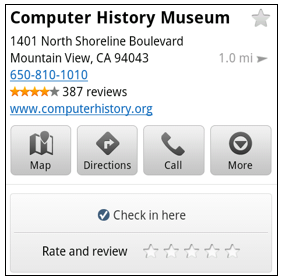
Check-ins and ratings have now been added to the Places page within the Maps application.

New check-in and rating buttons added to Place pages. The below Post from the Google Mobile Blog demonstrates the new features.
Now when you open a Place page from your mobile device, you can check in to places withGoogle Latitude or submit a rating or review by clicking on two new buttons at the top of the listing.
This past week I had the chance to explore the Computer History Museum during my visit to San Francisco from across the pond in London. Once nearby, I could quickly open the museum’s Place page and check in.
Screen%2Bshot%2B2011 05 24%2Bat%2B9.01.36%2BAM Google Maps 5.5 for Android Fixes things and Adds Features
When I was ready to leave and head to lunch, in a few seconds I could go back to the Place page and rate the museum – which certainly earned the 5 star rating it received from me.
Update home and work address for your Latitude Location History
Last month we released the Location History dashboard for Latitude which estimates how much time you spend at home, work, and everywhere else. If your home or work address changes, or you’d rather set a different address to represent ‘home’ and ‘work,’ you can now edit these addresses within Latitude.
Screen%2Bshot%2B2011 05 24%2Bat%2B9.03.07%2BAM Google Maps 5.5 for Android Fixes things and Adds Features
Change home/work location from Location History dashboard
View the redesigned transit station pages
It’s been about two years since we added transit directions in Google Maps for Android. Since then, we’ve increased the coverage from 250 cities to more than 440 and counting – the most recent being Washington, D.C. To make it easier to plan your transit route, we updated the transit station pages in this release to better organize the information you need.
Each page now includes a list of upcoming scheduled departures for different lines, all the transit lines serving the station, and links to nearby transit stations.
Screen%2Bshot%2B2011 05 24%2Bat%2B9.07.01%2BAM Google Maps 5.5 for Android Fixes things and Adds Features
Download Google Maps 5.5 for Android here to try out the new check-in and rating buttons, update your Latitude Location History home/work address, check out a transit station in a nearby city, or just make sure you have the latest version of Google Maps for Android. This update requires an Android OS 1.6+ device anywhere Google Maps is currently available.

Thursday, May 26, 2011

Video: How to play Tegra games without Tegra


Nvidia's Tegra is truly one tricked-out processor that supports some of the latest and greatestAndroid games. But what if you wanted to play next-gen titles on older, non-Tegra hardware?
Of course, buying a new smartphone or tablet would be the best option, but well, times are kind of rough and not everyone can afford to spring for fresh gear.
Fortunately, XDA-Dev members have coded an intermediary OpenGL driver which can be used to play (some) Tegra-specific games on non-Tegra Android devices.
Known as Chainfire3D, the driver sits between your apps and the graphics drivers, and can intercept and/or change commands between the two. It also boasts some built-in functions, and can be further extended with plugins to provide extra functionality.
Obviously, not all Tegra games work on every Android device with Chainfire 3D - and you still have to configure whatever you download correctly after using the "fix market settings" feature. 
But hey, if you don’t want to shell out the cash for a new device and have the time, you just might want to give Chainfire3D a try here.
Note: Chainfire3D is not compatible with Android Honeycomb.

Popular Posts